Solar Storage Hybrid EPM Operation for Single Meter
Version: 2.0 (31.12.2025)
For Downloadable format see attachment
Overview
This operation instruction is for the hybrid application scenarios of three phase energy storage inverters
of the S6-EH3P(30-50)K-H series and three phase grid tied inverter. In such scenarios, no more than 20
grid tied inverters and no more than 6 Hybrid inverters can operate in hybrid mode. Note: All inverters
mentioned in the text are from Solis. This document is for reference purposes only for Solis systems.
1. Background
- Applicable to hybrid scenarios with:
- Up to 20 grid-tied inverters
- Up to 6 hybrid inverters
- Hybrid inverter dynamically charges/discharges batteries based on smart meter data.
- Note: Generation data from existing grid-tied inverters will not appear in Solis monitoring.
2. PV Hybrid System Settings
2.1 Single Meter – Grid-tied inverter connected to AC Port
- Hybrid inverter uses smart meter data for self-use logic.
- Battery charging/discharging adjusts based on load and inverter conditions.
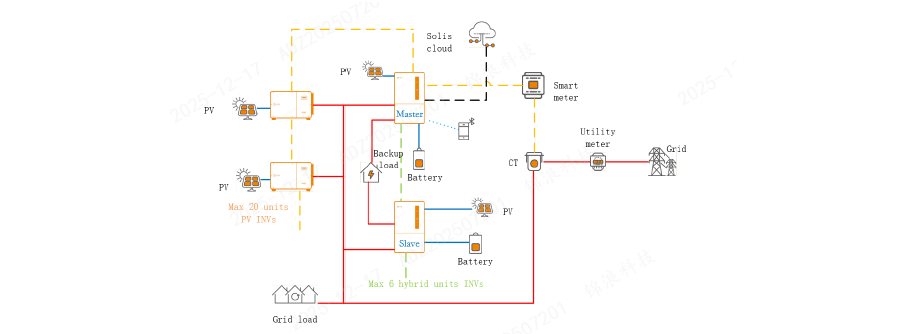
2.2 Single Meter – Grid-tied inverter connected to Smart Port
Load Increase Process:
- Grid-tied inverter supplies load first.
- Battery supplements if grid-tied power is insufficient.
- Grid provides excess power and charges battery if needed.
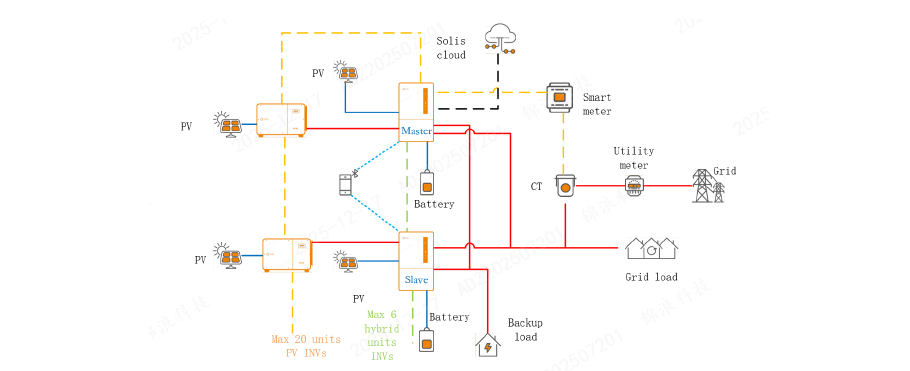
Load Decrease Process:
- Grid-tied inverter supplies load and charges battery.
- Once battery is full, system reduces grid-tied power to prevent over-frequency.
3. Hardware Configuration
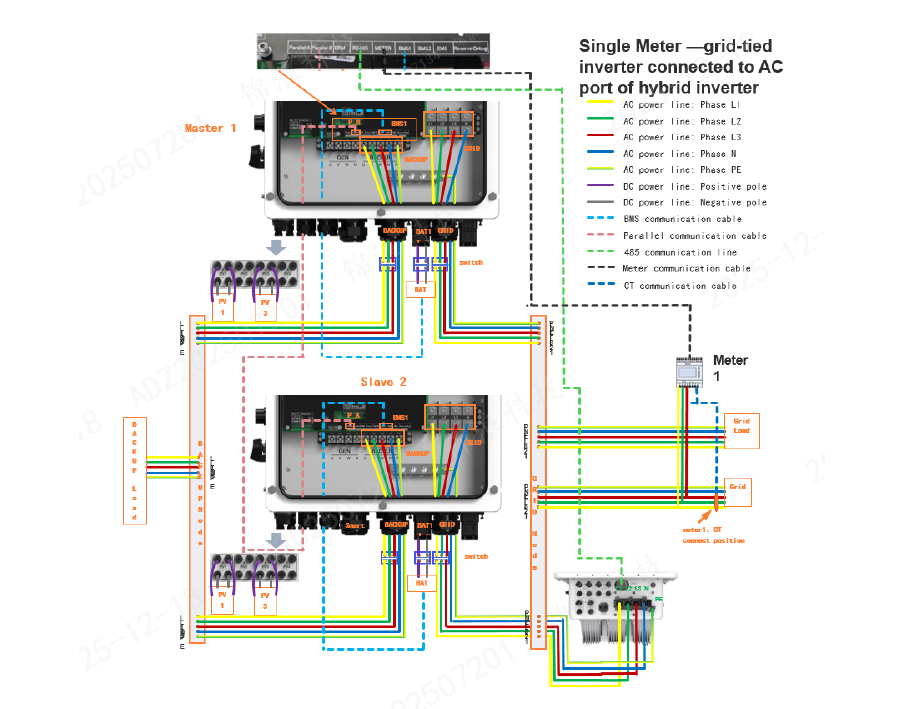
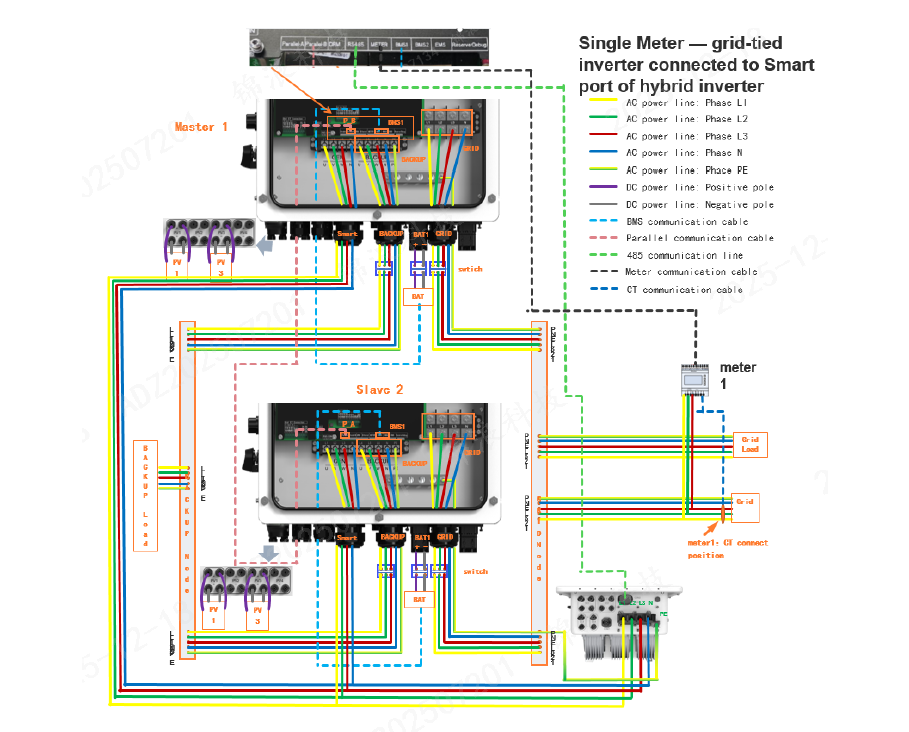
Step-by-Step Wiring Guide
- Connect hybrid inverter grid terminals to GRID node.
- Connect grid-tied inverter:
- To GRID node (AC Port scenario)
- To Smart Port (Smart Port scenario)
- To GRID node (AC Port scenario)
- Connect BACKUP terminals to backup node.
- Connect grid and load lines to GRID node.
- Connect backup loads to BACKUP node.
- Connect battery lines to BAT1 (orange = positive, black = negative).
- Connect PV lines to PV1/PV3 (upper = positive, lower = negative).
- Connect BMS lines to BMS1 on ARM board.
- Connect parallel communication cables between master and slave inverters.
- Connect COM port of grid-tied inverter to hybrid inverter Ethernet port.
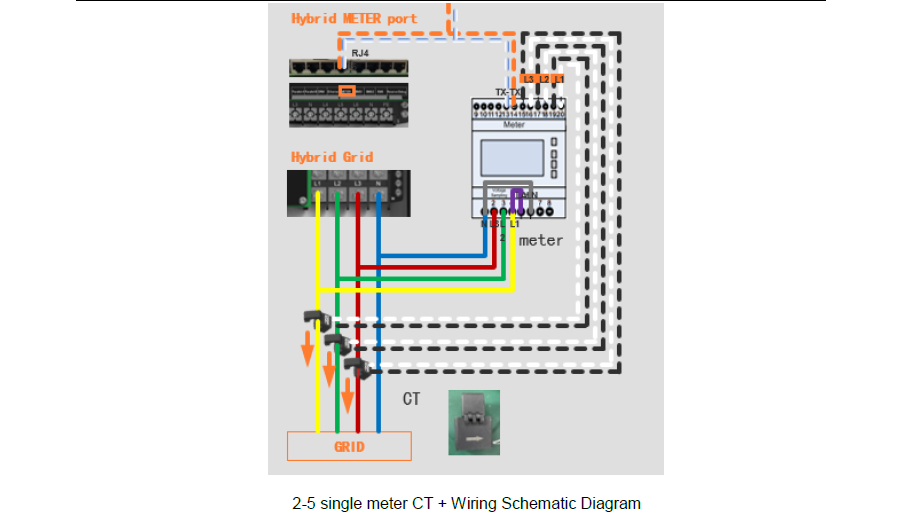
- Wire smart meter (L1, L2, L3, N) and CTs correctly; arrow on CT points to grid.
- Connect meter communication to METER port on ARM board.
- Set DIP switches on ARM boards to ON.
- Power on inverters and meter; set meter address to 1.
4. Software Configuration
- Cloud Platform: V5.1.001
- Mobile App: V1.2.1
- LCD: V04-06
- Hybrid ARM: V0445
- Hybrid DSP: V0803
Steps:
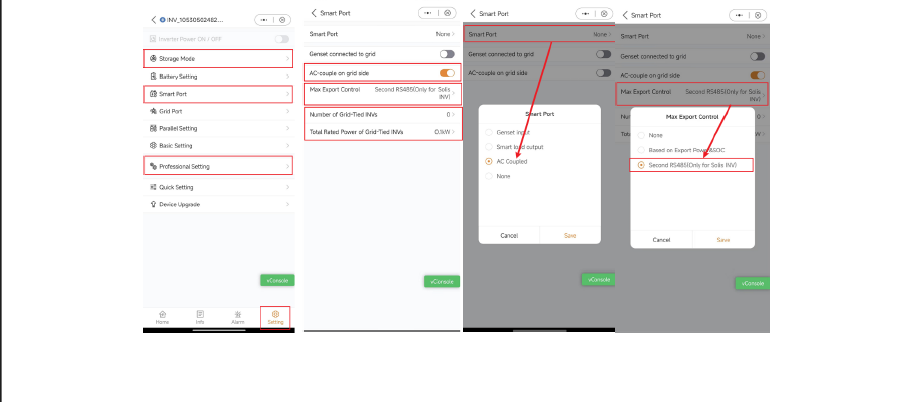
- Enable AC Coupling or Smart Port settings based on connection type.
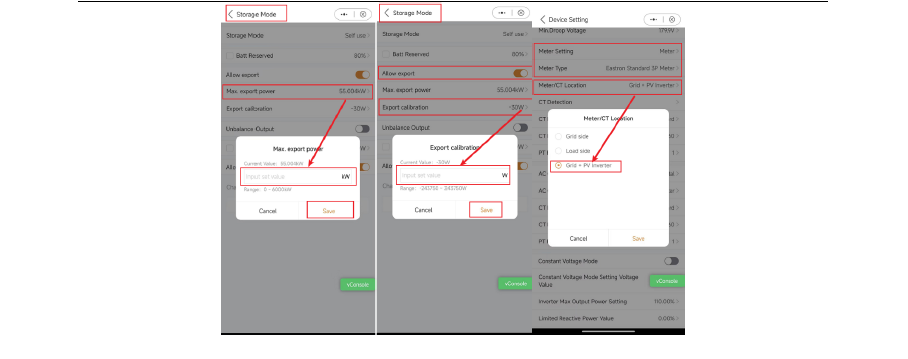
- Activate meter in Professional Settings → Device Settings.
- Set meter type to Eastron standard three-phase.
- Set meter position to grid side.
- Enable feed-in switch in Energy Storage Mode Settings.
- Configure maximum feed-in power for EPM control.
Additional Notes
- Compatible meters: Eastron or Chint (10–500A CT range, 0.2–1s response).
- Ensure all wiring and DIP switch settings are correct before powering on.